tiger-sense-pulse
Sensor Pulse
Simulated school IoT sensors on Tiger Cloud (TimescaleDB): a hypertable, continuous aggregates and an anomaly query, tested offline.
 · License: MIT · Built for MLH Global Hack Week: Hacktoberfest (Oct 2026)
Dashboard (GitHub Pages): aariv.me/tiger-sense-pulse/dashboard.html · Project summary: aariv.me/tiger-sense-pulse/docs/ · Code: https://github.com/draarivpatel-ui/tiger-sense-pulse
Live link: there is no hosted web app: this is a database project. It runs on your own Tiger Cloud service with
./run.sh, anddashboard.htmlis a static page it generates. The copy generated from the local test is the one served by GitHub Pages (links above).
One line: six simulated school sensors stream into a TimescaleDB hypertable on Tiger Cloud, continuous aggregates roll them up hourly and daily, and an anomaly query catches the two incidents hidden in the data.
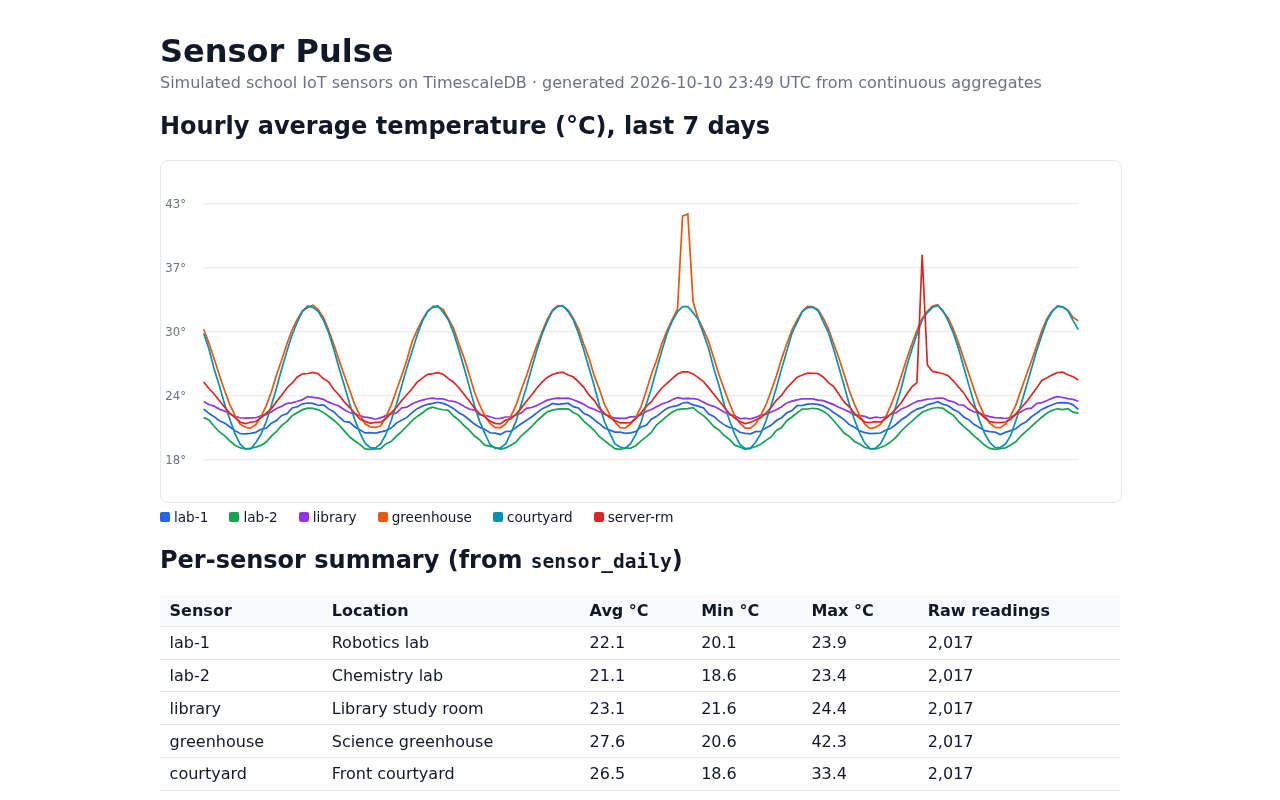
The generated dashboard.html, rendered with headless Chromium (Oct 2026).
Contents: Judge it in 60 seconds · Features · Tech · Run it on Tiger Cloud · How it was tested · Limits · Parts 2-4 · AI assistance · Files
GHW challenges covered
Built by Aariv Patel for MLH Global Hack Week: Hacktoberfest (Oct 2026). Monitoring building and campus room telemetry (robotics lab, chemistry room, library, greenhouse, courtyard, and server closet) makes it possible to catch an AC or vent failure without scanning every raw reading by hand. This repository covers several Tiger Data challenges in one place (the first three below; vector search, Tiger CLI + MCP and real-time financial data are Parts 2-4 further down):
| GHW challenge | Where it lives |
|---|---|
| Set up a Tiger Cloud service and create your first Hypertable | sql/01_schema.sql |
| Simulate an IoT sensor dataset with Tiger Cloud | sql/02_simulate.sql |
| Accelerate Dashboards with Continuous Aggregates | sql/03_continuous_aggregates.sql, dashboard.py |
| Ingest real-time financial data into Tiger Cloud (Part 4) | finance/schema.sql, finance/ingest.py |
Judge it in 60 seconds
No database, no pip install, no network: just git and Python 3.9+. Everything below was copied from real runs (Python 3.12, Oct 11-16, 2026).
1. Get the code and run the tests (~2 s):
git clone https://github.com/draarivpatel-ui/tiger-sense-pulse.git
cd tiger-sense-pulse
bash test.sh
Expected output (78 of the 82 ... ok lines trimmed; your time will differ):
test_empty_database_still_writes_a_page (test_dashboard.DashboardPage.test_empty_database_still_writes_a_page) ... ok
test_escapes_text_from_the_database (test_dashboard.DashboardPage.test_escapes_text_from_the_database) ... ok
...
test_strings_and_comments_are_terminated (test_sql_lint.SqlFileLint.test_strings_and_comments_are_terminated) ... ok
test_vector_schema (test_sql_lint.SqlFileLint.test_vector_schema) ... ok

----------------------------------------------------------------------
Ran 82 tests in 1.064s

OK
2. Replay the IoT simulation and the anomaly finder offline (~1 s). This uses the same Python replay of sql/02_simulate.sql and query 5 that the tests use, with the clock pinned and seeded noise so the output is repeatable:
cd tests && python3 -c "
from datetime import datetime, timezone
from test_generator import simulate, anomalies
data = simulate(datetime(2026, 10, 10, 23, tzinfo=timezone.utc), seed=1)
print('rows:', len(data))
for name, hour in anomalies(data):
    print('anomaly:', name, hour.strftime('%Y-%m-%d %H:00 UTC'))
"
Expected output:
rows: 12102
anomaly: greenhouse 2026-10-07 19:00 UTC
anomaly: greenhouse 2026-10-07 20:00 UTC
anomaly: server-rm 2026-10-09 17:00 UTC
12,102 rows and exactly the three injected hours (greenhouse vent shut for two, server-closet AC failure for one), no false positives. Compare with what the real TimescaleDB run returned for the same query in sample-output.txt (grep -A6 "^--- 5. Anomaly" sample-output.txt, run from the repo root):
--- 5. Anomaly finder: hours running > 4 C above that sensor's typical (median) for the same hour of day
    name    |         bucket         | max_temp | above_typical
------------+------------------------+----------+---------------
 greenhouse | 2026-10-07 19:00:00+00 |     42.2 |           8.8
 greenhouse | 2026-10-07 20:00:00+00 |     42.3 |           9.0
 server-rm  | 2026-10-09 17:00:00+00 |     38.2 |          12.0
(3 rows)
3. See the dashboard: open dashboard.html in any browser (a static page generated from the continuous aggregates; preview at the top of this README).
The full pipeline on a live database is DATABASE_URL=... ./run.sh (see “Run it on Tiger Cloud” below); steps 1 and 2 check the files and the generator logic, not a live database.
Features
- Hypertable.
sensor_datais created withWITH (tsdb.hypertable, tsdb.segmentby = 'sensor_id', tsdb.orderby = 'time DESC', tsdb.chunk_interval = '1 day'), so TimescaleDB splits it into one chunk per day. A normalsensorstable holds metadata (name, type, location) and is joined in queries. - IoT simulation. Six sensors around a school (robotics lab, chemistry lab, library, greenhouse, courtyard, server closet) report temperature, humidity and CPU load every 5 minutes for 7 days: 12,102 rows made with
generate_series. Instead of plainrandom(), each sensor follows a daily sine curve (warmest around 3 PM US Central) plus noise, and two incidents are injected: a greenhouse vent left shut and a server-closet AC failure. - Continuous aggregates.
sensor_hourlypre-computes hourly avg/min/max temperature, average humidity, peak CPU and reading counts.sensor_dailyis a hierarchical CAGG built on top of the hourly one. Both get refresh policies (every 30 min and every hour), so new data rolls up automatically in the background. - Queries (
sql/04_queries.sql): chunk count, latest reading per sensor (DISTINCT ON), 30-minute buckets withlast(), a daily summary, an anomaly finder that flags any hour running more than 4 °C above that sensor’s typical (median) reading for the same hour of day, anEXPLAIN ANALYZEcomparing the raw table with the CAGG, and the list of background refresh jobs. - Dashboard (
dashboard.py): reads only the continuous aggregates and writes a staticdashboard.htmlwith an inline-SVG chart, a per-sensor summary and the anomaly table. No JavaScript libraries.
Tech
- Tiger Cloud (managed TimescaleDB on PostgreSQL): hypertable,
generate_seriessimulation, hierarchical continuous aggregates with refresh policies,time_bucket,last(),percentile_cont. - psql + a 10-line
run.shto apply the four SQL files in order. - Python 3 (
psycopg, seerequirements.txt) fordashboard.py, which writes a static HTML page with an inline SVG chart. No JavaScript libraries.
Schema (as created by sql/01-03, and as it exists on the Tiger Cloud service)
| Object | Columns |
|---|---|
sensors (table) |
id, name, type, location, base_temp, swing |
sensor_data (hypertable) |
time, sensor_id, temperature, humidity, cpu |
sensor_hourly (CAGG) |
bucket, sensor_id, avg_temp, min_temp, max_temp, avg_humidity, max_cpu, readings |
sensor_daily (CAGG on sensor_hourly) |
day, sensor_id, avg_temp, min_temp, max_temp, readings |
sql/04_queries.sql and dashboard.py use exactly these names (temperature, not temperature_c; day/avg_temp/min_temp/max_temp on sensor_daily).
Data sources
All data is simulated by sql/02_simulate.sql (sine-curve daily cycle plus random noise and two injected incidents). No real sensors or outside datasets are used. The one exception is Part 4 (finance/), which ingests live crypto prices from the CoinGecko Keyless Public API (data provided by CoinGecko, https://www.coingecko.com/en/api).
Results from a test run
From sample-output.txt (local test, see “How it was tested” below):
sensor_databecame a hypertable with 8 chunks holding 12,102 rows.- The anomaly finder caught exactly the two injected incidents: the greenhouse at +8.8 / +9.0 °C for two hours, and the server closet at +12.0 °C for one hour. No false positives.
- Same question (“hourly average per sensor”), two ways: the raw hypertable took ~3.5 ms to aggregate 12,102 rows; the continuous aggregate returned the 1,014 pre-computed rows in ~0.2 ms. That’s tiny either way at this size. The gap is what grows as raw data piles up.
Run it on Tiger Cloud
- In Tiger Console, create a service and copy its connection string (
postgres://tsdbadmin:...@<id>.tsdb.cloud.timescale.com:<port>/tsdb?sslmode=require). -
Either paste the four SQL files, in order, into the Console’s SQL editor (
04_queries.sqluses\echo, which is psql-only; skip those lines in the web editor), or from a terminal withpsqlinstalled:export DATABASE_URL="postgres://tsdbadmin:<password>@<host>:<port>/tsdb?sslmode=require" ./run.sh -
Build the dashboard (
dashboard.pyreadsDATABASE_URLtoo; if you used the Console editor in step 2, export it first, or the script stops withKeyError: 'DATABASE_URL'):export DATABASE_URL="postgres://tsdbadmin:<password>@<host>:<port>/tsdb?sslmode=require" # skip if already set in step 2 pip install -r requirements.txt python dashboard.py # writes dashboard.html
01_schema.sql drops and recreates only the demo objects (sensors, sensor_data, sensor_hourly, sensor_daily), so it’s safe to re-run.
How it was tested
Offline test suite (no database needed)
bash test.sh # same as: python3 -m unittest discover -s tests -v
82 tests, Python 3.9+ standard library only (no pip install, no database, no network). They also run on every push in GitHub Actions on Python 3.9, 3.12 and 3.13 (.github/workflows/tests.yml); I also ran the suite locally on 3.12 and 3.13 with DeprecationWarning and ResourceWarning turned into errors (82 OK on both).
- SQL file lint (
tests/test_sql_lint.py, 15 tests): every.sqlfile is clean UTF-8 with a comment header, strings and comments are closed, parentheses balance, every statement ends with;,\echoappears only in04_queries.sql,DROPs only touch the four demo objects and useIF EXISTS, no passwords in connection strings,run.shapplies the four files in order withON_ERROR_STOP, the README schema table matches the realCREATEcolumns, everyalias.columnin04_queries.sql,dashboard.pyandvector_search.pyexists, and the dashboard’s anomaly query is identical to query 5. - Generator unit tests (
tests/test_generator.py, 13 tests): reads the constants out ofsql/02_simulate.sqland replays the simulation in Python with seeded noise. Checks 6 sensors × 2,017 timestamps = 12,102 rows, the daily peak at 20:00 UTC (3 PM US Central), plausible temperature and humidity ranges, that both incidents hit real sensors in non-overlapping windows, and that the anomaly finder flags exactly the 3 injected hours (greenhouse 2, server closet 1) with no false positives across 25 random seeds. Also checks the 30 notes invector/notes.py(chronological, Oct 4-10, every sensor named and covered, incident clusters on Oct 7 and Oct 9). - Dashboard generator (
tests/test_dashboard.py, 18 tests):psycopgis stubbed. Checks the SVG chart (one line per sensor, every point inside the viewBox, hotter is higher, no divide-by-zero, a flat line and naive (no-timezone) datetimes stay finite, NaN/inf values and NULL hourly averages are skipped instead of drawn, colors cycle, names escaped) and the writtendashboard.html(summary and anomaly rows, “No anomalies found.”, an empty database, anomaly hours printed in UTC (a naive bucket is assumed UTC, and the schema’sTIMESTAMPTZcolumn that keeps buckets timezone-aware is pinned), HTML escaping of sensor names and locations in both tables, and that it only queries the continuous aggregates, never the raw hypertable). - Finance feed (
tests/test_finance.py, 22 tests): parsing of the CoinGecko/simple/priceresponse (exactDecimalprices, UTC timestamps, bad or missing rows skipped, 429 bodies raise), de-duplication of repeated updates, the 1 request/second floor and capped backoff, a keyless URL, the HTTP 403 (bot block) and 429 (rate limit) fallback (last good prices plus a “live prices unavailable” note, nothing re-inserted, “no cached prices yet” before the first live poll, other HTTP errors still raise), and the shape offinance/schema.sql(hypertable keyed on(symbol, time), 1-minute OHLC continuous aggregate with a refresh policy, noDROP). - Finance query helpers (
tests/test_finance_query.py, 4 tests):finance/query.pyvalue formatting (None,Decimal, float, int, str) and the plain-text table renderer (aligned header and rows, empty result keeps the header and a zero row count). - README consistency (
tests/test_readme.py, 10 tests): this README can’t drift from the repo. The test counts above equal the real suite, every path in “Files” and every backticked file name exists, relative links resolve, the anomaly table quoted in step 2 is byte-for-byte the block insample-output.txt, the replay output quoted in step 2 is what the generator actually prints, and the incident wording (2 incidents, 3 anomalous hours) matches both the generator and query 5 insample-output.txt, the four... oklines quoted in step 1 are the suite’s real first two and last two, and the Tiger Cloud run’s “16 rows (8 days × 2 sensors)” follows from the 7-day window insql/02_simulate.sqland the daily bucket insql/03_continuous_aggregates.sqlfor every run hour of 2026, with every other day count in this README (hero image text, step 2, the Files list) following that same window.
The tests check the files and the generator logic, not a live database. The end-to-end test is still running the whole pipeline:
DATABASE_URL="postgres://..." ./run.sh # builds schema, simulates data, creates CAGGs, runs the queries
- Self-hosted run: end to end against TimescaleDB 2.30.2 on PostgreSQL 16.15, built from source in a Linux sandbox.
sample-output.txt,dashboard.htmlanddashboard-preview.pngcome from that run: 12,102 rows, 8 chunks, and exactly the 2 injected incidents found (3 anomalous hours in query 5). - Tiger Cloud run (Oct 10, 2026): the schema, simulation and continuous aggregates were run in the Tiger Console SQL editor on a Tiger Cloud service (AWS us-east-1, PostgreSQL 18.6, TimescaleDB 2.30.2). The simulation inserted 12,102 rows there, and a daily-summary query on
sensor_daily(day,avg_temp,min_temp,max_temp,readings) for the greenhouse and server closet returned 16 rows (8 days × 2 sensors; the 7-day window includes both ends andsensor_dailybuckets by UTC day, so it always touches 8 UTC days, the last one partial and usually the first too), with the greenhouse incident visible as a 42.3 °C max and the server-closet one as 38.6 °C. The Console’s editor took one statement per line, so the files were pasted statement by statement rather than throughrun.sh. - Older TimescaleDB builds note: the
CREATE TABLE ... WITH (tsdb.hypertable)syntax needs a recent TimescaleDB (it is what the Tiger Cloud docs use), and continuous aggregates are not available in Apache-only community builds.
Note: sample-output.txt shows times in UTC.
Limits and honesty
- Simulated data only. The sensors, the daily curve and the incidents are made up; the anomaly finder is tuned (4 °C above the hourly median) to this data and has not been tried on real sensors.
- Small scale. 12,102 rows is tiny for TimescaleDB, so the raw-vs-CAGG timing (~3.5 ms vs ~0.2 ms) shows the idea, not a benchmark.
- Not every query was re-run on Tiger Cloud. The full
./run.shoutput insample-output.txtis from the self-hosted run; on Tiger Cloud the schema, simulation, aggregates and thesensor_dailysummary were run in the Console. - The dashboard is static: re-run
python dashboard.pyto refresh it.
Part 2 (Oct 11): vector search with pgvector + pgvectorscale
vector/ adds AI-powered semantic search over staff maintenance notes stored right next to the sensor readings, on the same Tiger Cloud service.
vector/05_vector_schema.sqlenablesvector(pgvector 0.8.7) andvectorscale(pgvectorscale 0.9.0), creates amaintenance_noteshypertable with aVECTOR(384)column, and builds a StreamingDiskANN index (USING diskann ... vector_cosine_ops).vector/notes.pyholds 30 synthetic notes (Oct 4-10, 2026), each tagged with its sensor’s name; the loader looks the sensor id up by name, so the notes attach to the right sensor on any fresh database. Two clusters line up with the incidents injected into the sensor data (greenhouse vent shut, server-closet AC failure).vector/vector_search.pyembeds the notes locally with fastembed (BAAI/bge-small-en-v1.5, no API key), loads them, and runs similarity search combined with a time filter, a metadata filter (sensor type), and a join to thesensor_hourlycontinuous aggregate so each hit shows that hour’s peak temperature.
Real output from Tiger Cloud is in vector/sample-output.txt. For example, “the air conditioning broke and the room overheated” returns the two server-closet AC notes from Oct 9 first (similarity 0.764 and 0.757), and the query plan shows the diskann index being used on each chunk.
Run it: pip install "psycopg[binary]" fastembed (quoted so zsh doesn’t treat the brackets as a glob) then DATABASE_URL=... python vector/vector_search.py --load
Part 3 (Oct 11): Tiger CLI + MCP with an AI agent
The Tiger CLI (v0.26.0) was installed, authenticated with tiger auth login --headless (device code approved in the Tiger Console), and tiger service list shows the mlh-hackweek service. mcp/mcp_client.py launches tiger mcp start over stdio and lets an AI agent (Hark, the assistant that built this repo) list the 19 Tiger MCP tools and call service_list and db_query against the live service. Transcript: mcp/sample-transcript.txt.
Part 4 (Oct 13): real-time financial data
finance/ ingests live crypto prices into the same Tiger Cloud service. The GHW guide uses Twelve Data, which needs an account and API key; this version uses the CoinGecko Keyless Public API instead (no key, no sign-up), so no new account was created.
finance/schema.sqlcreates thecrypto_tickshypertable (time,symbol,price,volume_24h_usd, keyed on(symbol, time)) and thecrypto_ohlc_1mreal-time continuous aggregate (1-minute open/high/low/close plus tick count) with a refresh policy that runs every minute.finance/ingest.pypolls BTC, ETH and SOL in one request every 20 s (well under 1 request/second), backs off on HTTP 429 and HTTP 403 (CoinGecko can bot-block scripted clients) while printing a “live prices unavailable” note with the last good prices (never re-inserted), skips repeats of the same price update, and inserts withON CONFLICT DO NOTHING. The parsing lives infinance/feed.py(standard library only, unit-tested).finance/query.pyprints the hypertable, ticks per symbol, the candles and the refresh job. Real output from the live run is infinance/sample-output.txt.
Details and limits: finance/README.md. Data provided by CoinGecko (https://www.coingecko.com/en/api).
Built with AI assistance
Honest disclosure: this project was built with AI assistance. An AI assistant (Hark) wrote the SQL, the Python dashboard and this README and ran the local tests on behalf of Aariv Patel (GitHub: draarivpatel-ui) for his GHW Hacktoberfest participation. The schema and queries follow Tiger Data’s tutorials:
Files
sql/01_schema.sql                 sensors table + sensor_data hypertable
sql/02_simulate.sql               7 days of realistic simulated readings + 2 injected incidents
sql/03_continuous_aggregates.sql  hourly + hierarchical daily CAGGs with refresh policies
sql/04_queries.sql                demo / analysis queries
run.sh                            runs all four files against $DATABASE_URL
dashboard.py                      static HTML dashboard from the CAGGs
sample-output.txt                 output of ./run.sh from the local test
dashboard.html / dashboard-preview.png   generated dashboard from the local test
docs/hero.png                     screenshot of dashboard.html used at the top of this README
test.sh                           runs the offline test suite (tests/)
tests/                            SQL lint, generator, dashboard and README-consistency tests (standard library only)
vector/                           Part 2: pgvector + pgvectorscale semantic search over maintenance notes
mcp/                              Part 3: Tiger CLI + MCP client
finance/                          Part 4: real-time crypto prices -> hypertable + 1-minute OHLC continuous aggregate
License: MIT